High-volume applicants
- Keep dozens of applications a week organized.
- See at a glance which ones moved forward.

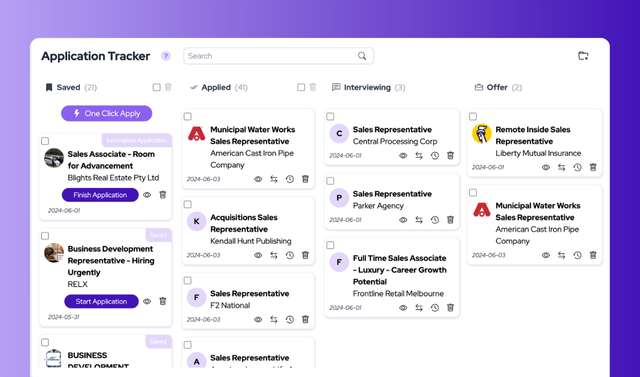
JobsAICopilot’s AI Job Tracker is a job application tracker that automatically records every job your AI copilot saves or applies to, on one drag-and-drop board from “Saved” to “Offer”.
Because it is built into our AI job application bot, there is nothing to copy: jobs found by automated job search appear as “Saved”, and applications sent by auto apply appear as “Applied”.
A job application tracker is one place to record every job you apply to, its status and your next step, so nothing slips through the cracks. Most trackers are spreadsheets or boards you update by hand. JobsAICopilot’s AI Job Tracker fills itself: each job your copilot saves or applies to is added automatically with its full description, and you move it from stage to stage with a simple drag.
As of October 2026.
Activate your copilot. It immediately starts searching and applying for jobs that match your preferences.
Jobs appear automatically. Each one is added to the Job Application Tracker as “Saved” or “Applied”, with the full job description attached.
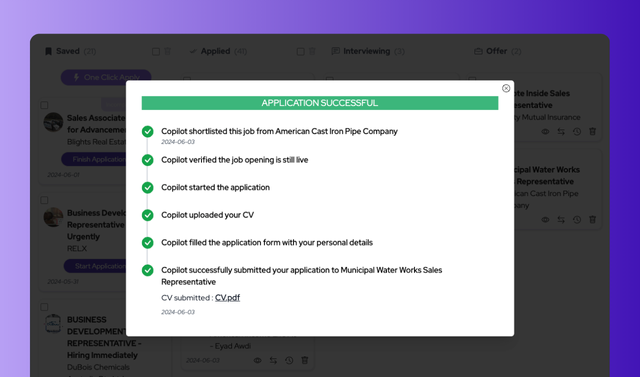
Move and manage. Drag cards between stages, open job details and see every step your copilot took — all from one dashboard.
How JobsAICopilot’s AI Job Tracker compares with a manual spreadsheet and with general-purpose AI tools (as of October 2026).
| What matters | Spreadsheet or notes | Generic AI tools | JobsAICopilot AI Job Tracker |
|---|---|---|---|
| Adding a job | Copy the title, company and link by hand | Paste the details into a chat | Added automatically when your copilot saves or applies |
| Job description | A link that may stop working | Lost when the chat ends | Stored with each application |
| Status updates | Edit a cell | Ask again every time | Drag and drop between stages |
| Application history | Whatever you remembered to write down | None | Every step your copilot took, logged |
| Capacity | Gets unwieldy as rows pile up | Limited by the conversation | Unlimited applications |
| Connection to applying | None | None | Built into job search and auto apply |
Job searching doesn’t have to be overwhelming. With the AI Job Tracker you turn confusion into control: see where every application stands, know when to follow up, and spot which kinds of roles turn into interviews.
Anyone with more than a handful of applications in flight.
Whatever tool you use, the same few details keep a job search manageable — and make follow-ups and interview prep much easier.
Your copilot records the essentials for every job it saves or applies to, including the job description and its own application history, so your time goes into the next step instead of data entry.
Once a week, scan your tracker: follow up on applications that have waited about two weeks, and notice which job titles reach the interview stage most often. Then adjust your copilot’s titles and filters to match.
AI Job Tracker
Frequently asked questions about the AI Job Tracker
Still have a question?
Write to contact@jobsaicopilot.com or visit our contact page.
A job tracker is a tool for recording the jobs you are interested in or have applied to, with each one’s status and next step. JobsAICopilot’s AI Job Tracker does this automatically for the jobs your copilot handles, on a board with four stages: Saved, Applied, Interviewing and Offer.
It syncs with your copilot’s actions. Jobs applied to automatically are added to the “Applied” stage once submitted. If you prefer reviewing jobs before applying, new matches show up in “Saved” for your approval. Either way, you can run your job search hands-on or fully automated.
Drag and drop it. Moving a card from “Applied” to “Interviewing” or “Offer” updates its status instantly, so your progress stays organized and visible at every step. There are no forms to fill in or cells to retype, which is what makes spreadsheets so hard to keep up to date.
Yes. There is no limit on the number of applications you can manage, whether your search is small or runs to hundreds of applications. On Elite, your copilot alone can add up to 50 applications a day, and the board keeps them organized by stage, which makes it practical even for very large searches.
Yes, especially once you apply to more than a handful of roles. A tracker shows which applications are waiting, which turned into interviews and which companies to follow up with, and it keeps job descriptions on hand for interview prep. An automatic tracker gives you all of that without the data entry.
Yes. Each job in the tracker shows a full history of the steps your AI copilot took on your behalf, alongside the complete job description. It is a transparent record of every automated application — handy when an employer calls you about a role.
If you haven’t heard back, a short, polite follow-up about one to two weeks after applying is reasonable, unless the posting gave its own timeline. Mention the role and the date you applied, and restate your interest in a sentence or two. Your “Applied” column shows at a glance which applications are still waiting.
Yes. As of October 2026, the AI Job Tracker is included at no extra cost in both plans: Premium ($14.54/week) and Elite ($17.92/week). JobsAICopilot has no free trial, but weekly billing lets you try the full product with a small commitment.
Guides
Further reading from the JobsAICopilot blog.
Let your copilot apply to up to 20 jobs a day on Premium ($14.54/week) or 50 on Elite ($17.92/week) and log every one in your tracker automatically.