
Best AI Job Application Tools (2026): Auto-Apply Compared
The best AI job application tools compared: auto-apply bots, autofill extensions and resume tailoring. Pricing, limits, ban risk and who each fits.

The best AI job application tool depends on how much of the work you want automated. For hands-off daily applying with an approval step, an AI job application bot such as JobsAICopilot (our product) or JobCopilot fits best; for free help filling in forms yourself, Simplify’s Copilot extension; for pay-per-application automation, AIApply or Jobscan credits; and for maximum volume on a low annual budget, LazyApply. Below, we compare ten tools on price, limits, where they apply and how much control you keep.
Key takeaways
- AI job application tools fall into four types: autofill extensions, credit-based auto-apply, AI job application bots and done-for-you services.
- Prices on vendors’ own sites in October 2026 range from free tiers to $999 a year; several tools do not publish prices at all.
- Where a tool applies matters: company career pages avoid the account risk that comes with automating sites such as LinkedIn.
- The safest tools give you a daily limit, a review step and resume tailoring for each job.
- Most people get the best results combining tools: manual applications for dream jobs, automation for the rest.

How we compared AI job application tools
On October 7, 2026 we read each tool’s own pricing page, FAQ and terms, and recorded only what the vendor publishes: plans, prices, limits, where the tool applies and whether you can review applications before they are sent. We did not buy every plan or run controlled tests, so this is a comparison of published facts, not a measure of interview rates. Prices may vary by region and change often.
JobsAICopilot is our product. We include it because it is one of the options, and we hold it to the same criteria. Our editorial policy explains how we review tools, including our competitors.
Which type of AI job application tool do you need?
| Type | What it does | You stay in control because… | Best for |
|---|---|---|---|
| Autofill extension (co-pilot) | Fills in forms in your browser | You click submit on every application | People applying to a handful of roles who want speed |
| Credit-based auto-apply | Applies for you, one credit per application | You buy small batches and often review drafts | Occasional automation on specific jobs |
| AI job application bot (agent) | Finds jobs and applies every day within your filters | You set limits and, in the best tools, approve each application | High-volume searches where time is the bottleneck |
| Done-for-you service | A paid team or service runs your search | You delegate almost everything | People who prefer to outsource; see job application services |
Most products sit in one type, and a few span two. If you mainly want help finding openings, look at automated job search; if you want the forms filled in and sent, look at AI automated job application. Our auto-apply guide explains how each type works in detail, and you can check our pricing for how JobsAICopilot bundles both.
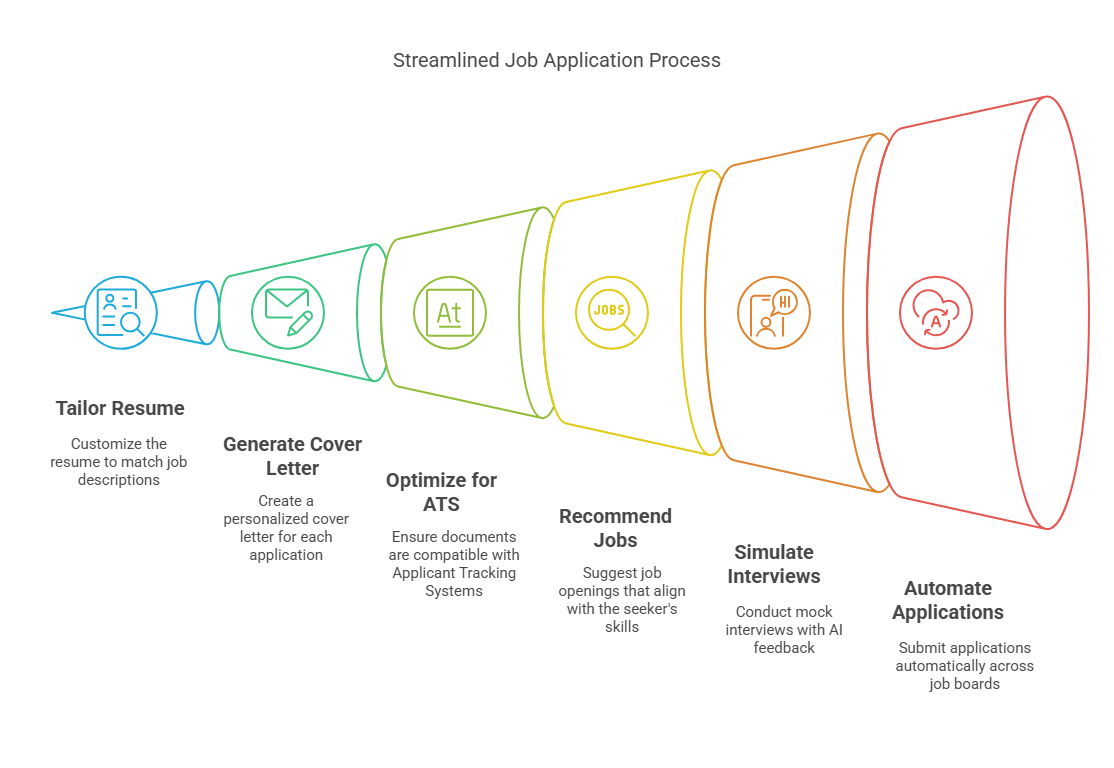
The best AI job application tools in 2026, compared
Published facts as of October 7, 2026. JobsAICopilot is our product.
| Tool | Type | Price (as listed) | Volume | Where it applies | Review before sending |
|---|---|---|---|---|---|
| JobsAICopilot | AI job application bot | Premium $14.54/week; Elite $17.92/week | 20 or 50 a day | 50,000+ company career pages | Yes, Review Mode |
| JobCopilot | AI job application bot | From $0.93/day (Premium) or $1.05/day (Elite) | 20 or 50 job matches a day | Official company career pages | Optional review |
| Simplify | Autofill plus Autopilot | Free; Simplify+ $19.99/week, $39.99/month or $89.99/3 months | Autopilot: 20 credits a week | Greenhouse, Workday, Lever, Ashby, iCIMS and more | Copilot: you submit |
| Jobright | Autofill plus AI agent | Free sign-up; paid plans priced in the app | Not published | Workday, Greenhouse, Lever, iCIMS, Ashby, Workable | Autofill: you submit |
| AIApply | Writing toolkit with credit-based auto-apply | Subscription plus credit packs; no public prices | 1 credit per application | ”Supported platforms,” not listed | Review drafts |
| LoopCV | Auto-apply plus recruiter emails | Free; €8.99/month; €29.99/month | 10, 100 or 300 a month | Job boards and, on Premium, company career pages | Edit before sending |
| LazyApply | Bulk auto-apply extension | $99, $149 or $999 a year | 15, 150 or 1,500 a day | Greenhouse, Dice, Indeed, ZipRecruiter | Not described |
| Wobo | AI auto-apply | Free; $34.99/month; $44.99/month | 5 a day free; unlimited paid | Not stated on its pricing page | You pick jobs, except on Autopilot |
| FastApply | Auto-apply plus extension | 5 free applications; from $12.67/month (90-day plan) | 200 to 1,000 a month | Job boards and applicant tracking systems | Match-score threshold |
| Jobscan | Resume optimization plus Auto Apply credits | Free; $49.95/month or $89.95/quarter; credits from $8.50 for 5 | Per credit | Jobs you choose | Yes, every application |
Two other well-known services, JobHire.ai and Sonara, do not publish prices on their public pages. JobHire.ai applies to U.S. roles only and made its fees non-refundable in July 2026; Sonara is now operated by Bold. Read our JobHire.ai review before choosing either.
Our picks by use case
Best for daily automation with approval: JobsAICopilot (our product)
JobsAICopilot finds openings on the career pages of 50,000+ companies and applies to up to 20 a day on Premium ($14.54/week) or 50 on Elite ($17.92/week), with an AI-tailored resume for every application on Elite. Review Mode lets you approve each application, and the AI Job Tracker logs everything. There is no free trial.
Best free autofill: Simplify
Simplify’s Copilot extension fills in applications on the major hiring systems and tracks what you submit, free. Simplify+ adds AI tailoring and answers from $19.99 a week, and Autopilot submits up to 20 applications a week. Payments are non-refundable once activated. See our comparison of Jobright vs Simplify.
Best for matching and referrals: Jobright
Jobright recommends roles, tailors your resume and suggests insider connections who could refer you, with free sign-up. Its Agent applies for you on paid plans, and its own blog says the Agent works best for tech roles. Pricing for paid features is shown in the app rather than on a public page.
Best for career-page applying: JobCopilot
JobCopilot says it “exclusively applies to verified jobs on official company career pages,” with up to 20 or 50 job matches a day and an option to review before applying. Its pricing page shows only per-day starting prices, and refunds are limited to technical issues reported within 7 days.
Best pay-per-application writing toolkit: AIApply
AIApply combines resume and cover letter writing, interview tools and Auto-Apply credits (one credit per application). There are no public prices, and the subscription does not include automated applications. Read our AIApply review.
Best for ATS keyword matching: Jobscan
Jobscan compares your resume with a job description and shows missing keywords; its free plan includes 5 scans a month. Its Auto Apply runs on credits and “nothing is submitted until you approve it.”
Best low-cost volume: LazyApply
LazyApply sells annual plans from $99 a year (15 applications a day) to $149 (150 a day). It suits people who want maximum volume on job boards at a low yearly price, with the caveats in our LazyApply review: annual-only billing, a narrow refund guarantee and mixed reviews.
Best budget option with recruiter emails: LoopCV
LoopCV applies and emails recruiters within monthly limits, from a free plan (10 a month) to €29.99 a month (300). Refunds are possible within 7 days if you used 10% or less of your quota.
Best swipe-style control: Wobo
Wobo’s free plan sends 5 applications a day, and on its Unlimited plan ($34.99 a month) you choose each job and Wobo submits it. Autopilot ($44.99 a month, with a 5-day free trial) lets Wobo choose as well. Its terms make fees nonrefundable except where required or offered.
Best for trying automation free: FastApply
FastApply offers 5 free applications without a card, then plans from $12.67 a month on its 90-day option (200 applications a month). Its “Apply for Me” mode only applies above a match score you set. All fees are non-refundable.
Free AI job application tools
If you want to start without paying, these free options were available on October 7, 2026:
- Simplify Copilot: free autofill and application tracking in your browser.
- Jobright: free sign-up for job matching, autofill and resume tailoring.
- Wobo Free: 5 automated applications a day.
- LoopCV Free: 10 applications or recruiter emails a month.
- FastApply: 5 free applications.
- Teal and Careerflow free plans: resume building and job tracking.
- Jobscan Free: 5 resume scans a month.
Free tiers are good for learning how each tool behaves. Paid plans start to make sense when you are applying to dozens of roles a week and the hours saved outweigh the cost.
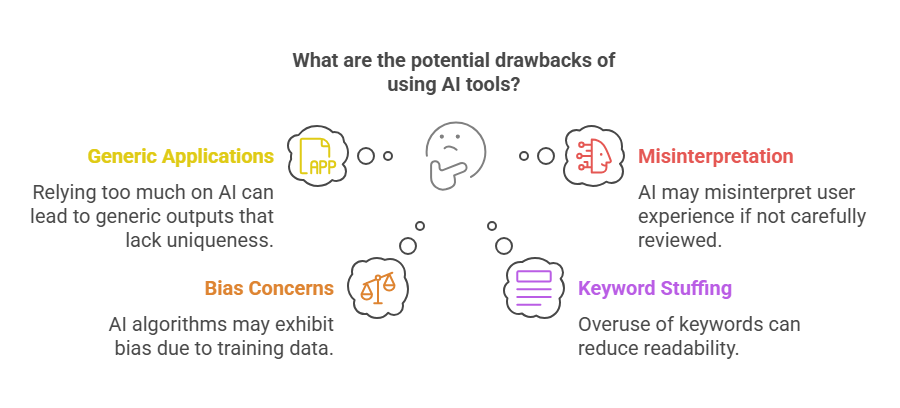
What AI application tools can’t do
Even the best tool has limits worth knowing before you buy:
- They can’t make you a fit. Recruiters still screen for skills, experience and location.
- They can’t guarantee interviews. Treat any interview-rate claim from a vendor as marketing, not a forecast.
- They can’t fix a weak resume. Automation multiplies whatever document you give it.
- They can’t replace relationships. Referrals still matter most for senior and competitive roles.
- They can’t take responsibility for your answers. You are accountable for everything submitted in your name.
Resume, tracking and interview tools that pair well
Application tools work best with good documents and organization:
- Teal (free plan; Teal+ $13 per 7 days, $29 per 30 days or $79 per 90 days) offers a resume builder and an unlimited job tracker, without auto-apply.
- Careerflow (free plan; Premium from $8.99 a week) covers resumes, LinkedIn optimization and tracking; see our Careerflow review.
- Interview practice matters once applications turn into calls; JobsAICopilot includes an AI Interview Simulator in every plan.
When an AI application tool is worth paying for
A tool is worth it when it buys back time you would otherwise spend on forms, and when it applies to jobs you actually want. If you send 20 applications a week by hand at 15 to 30 minutes each, that is roughly 5 to 10 hours. A subscription of a few dollars a week that does most of that work, with your review, is usually good value.
It is not worth it when volume is not your problem: senior roles filled through networks, very niche fields with few openings, or a resume that is not yet getting replies. Fix the resume first; automation multiplies whatever you feed it.
How to choose: 8 questions to ask before you pay
- Where does it apply: company career pages, job boards or both?
- Can I set a daily limit, or is it “unlimited” by default?
- Can I approve applications before they are sent?
- Does it tailor my resume for each job, or reuse one file?
- How does it answer open questions? Before paying, see how it handles “Why do you want to work here?”, “Describe a time you led a team” and “Are you willing to relocate?”
- Does it log every application in a tracker?
- Is the price published, and what is the refund policy?
- What does it do with my data, and does it need my passwords?
Safety rules for any AI application tool
- Never select “any job.” Applying to roles you would not accept wastes recruiters’ time and yours.
- Garbage in, garbage out. A typo in your base resume is copied into every application, so proofread it first.
- Use a dedicated email address so interview requests do not get buried.
- Check the first applications. Make sure years of experience, work authorization and salary answers are correct.
- Respect platform rules. LinkedIn’s User Agreement prohibits “bots or other unauthorized automated methods,” so keep LinkedIn applications manual.
- Read the billing terms before you subscribe; several tools make fees non-refundable.
The hybrid strategy: combine tools by tier
- Tier 1, dream jobs (manual). For your top 10 employers, write a tailored resume and cover letter yourself and reach out to people who work there.
- Tier 2, targeted search (automated with review). For roles that clearly match your experience, let an AI job application bot apply daily within strict filters, and approve each application.
- Tier 3, broad net (automated, low priority). For adjacent roles, contract work or side income, widen the filters and review results weekly.
Our guide on how to use AI to apply for jobs walks through this workflow step by step.
Key terms you will see when comparing tools
- ATS (applicant tracking system): the software employers use to receive and screen applications, such as Workday, Greenhouse or Lever.
- Autofill: a browser extension copies your saved details into an application form; you still submit it.
- Auto-apply: software fills in and submits the application for you.
- Credits: a pay-per-application model, usually one credit per submitted application.
- Review step or Review Mode: you approve each application before it is sent.
- Screening (knock-out) questions: yes/no or numeric questions, such as work authorization or years of experience, that can filter you out automatically.
- Match score: a tool’s estimate of how well a job fits your profile; some tools only apply above a threshold you set.
Our recommendation
There is no universal winner. Pick the type of tool that matches your bottleneck, check the published price and refund terms, and keep a review step until you trust the results. If daily, filtered applying to company career pages with approval is what you need, JobsAICopilot was built for that: start with AI automated job application, compare Premium and Elite on the pricing page, or browse more guides in Applying for Jobs.
Applying for Jobs
Frequently Asked Questions
Still have a question?
Write to contact@jobsaicopilot.com or visit our contact page.
Which AI tool is best for applying jobs?
It depends on how much you want automated. For hands-off daily applying with an approval step, use an AI job application bot such as JobsAICopilot, our product, or JobCopilot. For free help filling in forms yourself, Simplify's Copilot extension works well. For paying per application, AIApply and Jobscan sell Auto-Apply credits. Compare price, limits and review options.
What is the best AI application tool?
There is no single best tool for everyone. Judge tools on five things: where they apply (company career pages or job boards), daily limits you control, a review step before sending, resume tailoring per job, and published pricing with a clear refund policy. A tool that scores well on all five is a safer buy than one that only promises volume.
Are AI job application tools worth it?
They are worth it when your bottleneck is time and you apply to roles with many openings. A subscription of a few dollars a week can replace hours of form-filling. They are less worth it for senior roles driven by referrals or for very niche jobs. Start with a free plan or a short billing period and track your reply rate.
Which AI is best for making applications?
For writing the application itself, use tools that tailor documents to each posting: AI resume builders such as Teal, Careerflow or an AI resume creator, Jobscan for keyword matching, and AI cover letter generators. General AI assistants can draft text too, but you must check every claim. For submitting applications at volume, pair those with an auto-apply tool.
Which AI agent is best for a job application?
The best AI agent for job applications is one that applies only within your filters, on legitimate sites, and lets you approve applications. As of October 2026, agents such as JobsAICopilot, our product, JobCopilot and Jobright's Agent apply for you; JobsAICopilot and JobCopilot focus on company career pages. Test any agent with your hardest screening questions first.


