
How to Use AI to Apply for Jobs: Step-by-Step (2026)
A step-by-step workflow for using AI to apply for jobs: tailor your resume, write cover letters, automate applications and avoid the common mistakes.

To use AI to apply for jobs, work in steps: use it to find matching openings, analyze each job description, tailor your resume and cover letter, apply (by hand with autofill or automatically with an AI tool) and track and follow up, then practice for interviews. AI makes each step faster, but you stay responsible for accuracy, so keep a human review before anything is sent.
This guide gives you the full workflow, copy-and-paste prompts, a pre-submit checklist and the recruiter’s view, whether you use a free chatbot or an AI job application bot that applies for you.
Key takeaways
- Use AI at six stages: finding jobs, analyzing job descriptions, tailoring documents, applying, tracking and interview practice.
- The best prompts give AI your real resume and the job description, and tell it never to invent facts or numbers.
- Recruiters rarely reject AI use itself; they reject generic, inaccurate or mismatched applications.
- Automate volume, but review applications before they are sent and keep your dream-job applications personal.
- Track replies by role and adjust: AI amplifies whatever you feed it, good or bad.

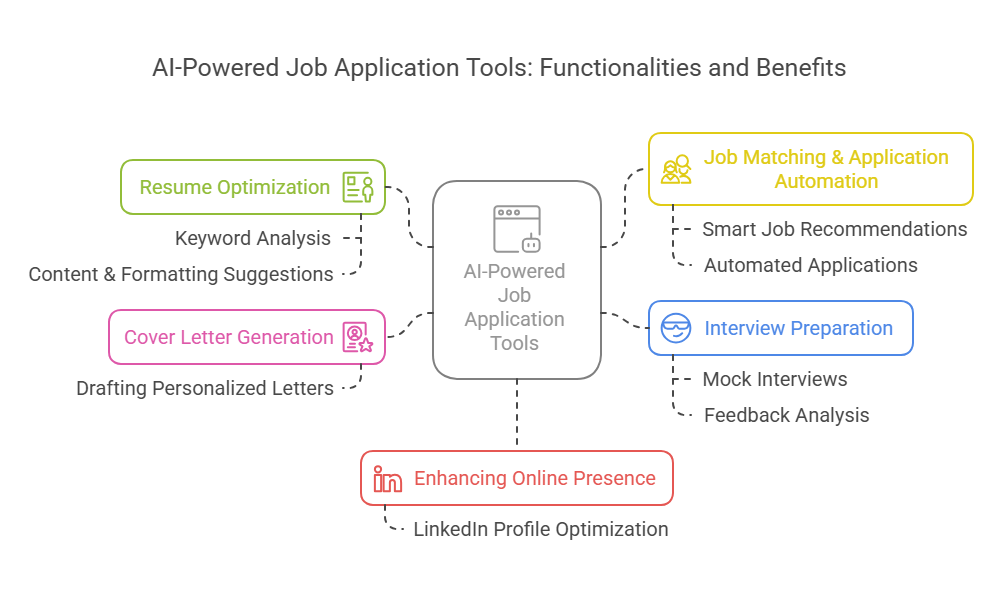
What AI can do at each stage of a job application
| Stage | What AI does | Example tools | Level of automation |
|---|---|---|---|
| Finding jobs | Recommends or finds openings that match your profile | Job board recommendations, Jobright, JobsAICopilot automated job search | Assisted to fully automatic |
| Analyzing the job | Extracts requirements and keywords | General AI assistants, Jobscan | Assisted |
| Tailoring documents | Rewrites resume bullets, drafts cover letters and answers | AI resume builders, cover letter generators, AI assistants | Assisted |
| Applying | Fills in forms or submits applications | Simplify Copilot (you submit), AIApply credits, JobsAICopilot (automatic within your filters, with Review Mode) | Assisted to fully automatic |
| Tracking | Logs applications and responses | Teal, Careerflow, JobsAICopilot AI Job Tracker | Manual to automatic |
| Interview prep | Role-plays interviewers and gives feedback | AI interview simulators, AI assistants | Assisted |
JobsAICopilot is our product. If you want the finding and applying steps automated, automated job search watches employers’ career pages for you and AI automated job application fills in and submits the forms within your rules (see pricing).
Step-by-step: how to use AI to apply for jobs
Step 1: Build a master resume and a skills inventory
Start with one complete, accurate master resume: every role, achievement and number you can stand behind. Then ask AI to turn it into a skills inventory you can reuse.
Prompt: “Here is my resume: [paste]. List my skills in three groups (technical, tools and soft skills), and for each skill quote the line in my resume that proves it. Do not add anything that is not in the text.”
An AI resume creator can format the master version and generate tailored copies later.
Tip: keep a prompt library. Save the prompts in this guide in a document, with your skills inventory and two or three of your strongest achievement stories underneath. Reusing the same tested prompts keeps quality consistent from one application to the next, and you can keep a separate version for each type of role you target.
Step 2: Find the right jobs, not just more jobs
Use AI to widen your search sensibly: job boards recommend roles based on your profile, and automated job search tools check company career pages for new openings that match your filters. Ask AI for adjacent titles you may be missing.
Prompt: “I am a [current title] with experience in [3 skills]. List 10 job titles I could apply for, including adjacent roles, and explain in one line why each fits.”
Step 3: Analyze each job description
Prompt: “Here is a job description: [paste]. List the 10 most important responsibilities and the 15 skills or keywords it emphasizes, in order of importance. Mark each as required or preferred.”
This takes seconds and tells you what the employer, and its screening software, will look for.
Step 4: Tailor your resume
Prompt: “Compare my resume [paste] with the job description above. Which required skills and keywords are missing or weakly shown? For each one, tell me whether my experience supports adding it and where it would fit. Do not suggest anything I have not done.”
Prompt: “Rewrite these three bullets for this role. Keep every fact true, start with a strong verb, keep each under 25 words and do not invent numbers: [bullets].”
Then edit the result so it sounds like you.
Step 5: Write the cover letter and screening answers
Prompt: “Write a cover letter of about 200 words for [role] at [company], using only facts from my resume. Open with why this role, include one achievement that matches [top requirement] and end with a one-sentence call to action. Plain, confident tone, no clichés.”
Prompt: “Draft a 100-word answer to ‘Why do you want to work here?’ using these two facts from the company’s website: [facts], and my experience in [area].”
An AI cover letter generator can do the same from your resume and the job posting.
Step 6: Apply, by hand or automatically
You have two options:
- Assisted: an autofill extension fills in the form, and you check and submit it. Best for a handful of important applications.
- Automated: an AI job application bot applies to matching roles within your filters every day. Best when you are applying at volume. Keep a review step on at first.
Our guide to auto apply for jobs covers the automated route in detail, including the risks.
Step 7: Track and follow up
Log every application with the date, role and contact, or let a tracker do it automatically. After about five business days without a reply, follow up.
Prompt: “Write a three-sentence follow-up email to [recruiter] about my application for [role] submitted on [date]. Mention one relevant achievement and ask about next steps. Polite and brief.”
Step 8: Prepare for interviews
Prompt: “Act as the hiring manager for [role]. Ask me five behavioral questions one at a time. After each answer, give feedback on structure (situation, task, action, result), specificity and length.”
The AI Interview Simulator in JobsAICopilot runs this kind of practice for your target role.
A worked example: one application, start to finish
Here is how the workflow plays out for an illustrative marketing coordinator application.
- Analyze the posting. The AI pulls out the requirements that matter most: email campaigns, a marketing automation platform, reporting on campaign results, social media scheduling and coordination with sales.
- Find the gaps. Comparing the list with the resume shows the candidate used a marketing automation platform at their last job but never mentioned it, and described reporting vaguely.
- Rewrite the bullets, truthfully. “Helped with email marketing” becomes “Built and scheduled weekly email campaigns in [platform] for a list of [size], and reported open and click rates to the sales team every Monday.” The numbers come from the candidate, not the AI.
- Draft the cover letter. The opening ties the role to one specific achievement and one reason for choosing this company; the candidate rewrites two sentences so it sounds like them.
- Answer the screening questions. Work authorization, years of experience and salary range are checked against the truth, not copied from a template.
- Apply and log it. The application goes in through the employer’s careers page and is recorded with the date and contact.
- Follow up and prepare. Five business days later, a short follow-up; meanwhile, practice answers to likely questions about campaign results.
The AI did most of the drafting; the candidate supplied every fact and made the final call on every line.
Prompts for questions you will meet on application forms
“Tell us about yourself”: “Using my resume [paste], write a 90-word answer for [role] that covers my current role, one relevant achievement and why this next step makes sense. First person, conversational.”
“Describe a challenge you overcame”: “Turn this situation into a 120-word STAR answer (situation, task, action, result) without adding details I did not give you: [notes].”
“Why are you leaving your current job?”: “Write a positive, honest 60-word answer focused on what I want to do next, based on these reasons: [reasons]. Do not criticize my current employer.”
“What are your salary expectations?”: “Using this market research [paste ranges you found] and my target of [range], draft a short answer that gives a range and stays flexible on total compensation.”
Always paste only what you are comfortable sharing, and remove identification numbers or other sensitive data before using any AI tool.
Your pre-submit checklist
Before any AI-assisted application goes out, check:
- Every fact, date and number is true and matches your LinkedIn profile.
- The company name, role title and hiring manager’s name are correct.
- Required keywords appear naturally, not as a stuffed list.
- Screening answers (work authorization, experience, salary, relocation) are accurate.
- The cover letter sounds like you and mentions something specific to this employer.
- Generic AI phrases are gone (“I am thrilled to apply,” “dynamic team player,” “leverage synergies”).
- The file is in the format requested, usually PDF, with a clear file name.
- The application is logged in your tracker.
How recruiters see AI-assisted applications
Employers use automation too. Applicant tracking systems and AI screening tools help recruiters sort large volumes of applications quickly and match candidates to requirements. That brings speed, but also risk: rigid rules can filter out qualified candidates, and automated tools can reduce or amplify bias depending on how they are built. New York City’s Local Law 144 responds to that risk: since July 2023, employers in the city may only use automated employment decision tools that have had a bias audit within the past year, and they must notify candidates.
What does that mean for you?
- Recruiters care about fit and accuracy. An AI-drafted cover letter that is specific and true is not a problem; one that is generic or wrong is.
- They notice patterns. The same letter sent to every company, buzzwords without results and details that change between your resume and your interview stand out.
- Screening software reads keywords. Tailoring to the job description matters, as long as every keyword reflects real experience.
- Speed and volume are visible. Applying to many unrelated roles at one company looks careless, whoever filled in the forms.
Is it okay to use AI to apply for jobs?
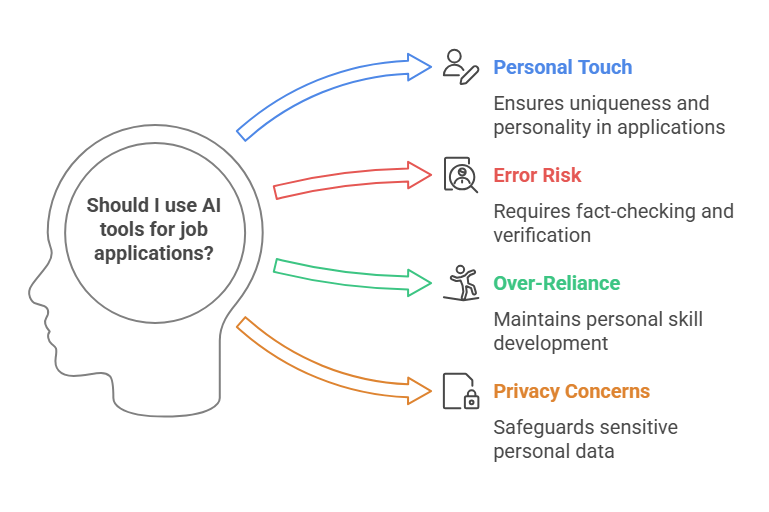
Using AI to prepare and submit applications is widely accepted, and many employers use AI themselves. Three rules keep it ethical and effective:
- Truth first. Never let AI add skills, titles, degrees or numbers you cannot back up.
- Review before sending. Read applications before they go out, especially screening answers.
- Follow the rules of each platform. LinkedIn’s User Agreement, for example, prohibits “bots or other unauthorized automated methods,” so keep LinkedIn activity manual.
There is also a fairness question: if everyone automates, the advantage shifts back to quality and relationships. Use automation to save time on routine applications, and spend that time on networking and preparation for the roles you want most.
Common mistakes when using AI to apply
- Pasting AI output without editing. It reads generic, and it may contain errors.
- Letting AI invent achievements. It is dishonest, and easy to expose in an interview.
- Tailoring every keyword and losing readability. Write for a person first, software second.
- Applying to everything. Volume without fit lowers your reply rate and wastes recruiters’ time.
- Sharing sensitive data carelessly. Remove ID numbers and anything you would not want stored before pasting documents into AI tools.
- Never measuring results. Track replies per role and adjust your approach each week.
Who benefits most from AI in the application process
- Recent graduates applying to many entry-level roles; the AI Student Career Helper adds guidance on first jobs.
- Career changers who need to translate experience into a new field’s language; see the AI Career Change Helper.
- Busy professionals searching while employed, who cannot spend evenings on forms.
- Non-native English speakers, who can use AI to polish grammar and tone while keeping their own content.
How to choose your AI setup
Match the setup to your search:
- A handful of targeted applications: a free AI assistant plus an autofill extension and a simple tracker.
- Dozens of applications a week: an AI job application bot with tailoring, daily limits and a review step.
- A mix: automate the routine roles and write your top-choice applications yourself.
For a side-by-side look at the options and their prices, read our guide to the best AI job application tools, and if you are considering paying someone to apply for you, compare job application services, AI vs human.
Put the workflow on autopilot, with you in control
You can run every step above with free tools and some discipline. If you would rather have steps 2, 4, 6 and 7 handled every day, JobsAICopilot finds matching roles on company career pages, tailors your resume (an AI-tailored resume for every application on Elite), applies within your rules and logs everything, with Review Mode to approve each application. Start with AI automated job application or the AI Resume Creator, and compare plans on the pricing page. More guides are in Applying for Jobs.
Applying for Jobs
Frequently Asked Questions
Still have a question?
Write to contact@jobsaicopilot.com or visit our contact page.
How are people using AI to apply to jobs?
Most job seekers use AI in four places: analyzing job descriptions for keywords, tailoring resume bullets and cover letters, preparing for interviews, and applying at volume with autofill extensions or AI job application bots. The people who get results keep a human review step, so every application stays accurate and relevant to the role.
Is it okay to use AI for job applications?
Yes, as long as everything you submit is true and you can stand behind it in an interview. Employers judge whether you fit the role, not which tool drafted your cover letter. Avoid inventing skills or numbers, follow each platform's rules on automation, and answer honestly if an employer asks whether you used AI.
Can employers tell if you use AI for a resume?
Sometimes. A few employers use detection tools, but recruiters more often notice the symptoms: generic phrases, buzzwords without results, the same cover letter sent to every company and details that do not match your LinkedIn profile or interview answers. Edit AI drafts into your own voice and add specific, verifiable achievements.
How to use AI to write a job application?
Paste the job description into an AI assistant and ask for the key requirements; compare them with your resume to find gaps; rewrite your bullets using only true facts; draft a short cover letter that names one relevant achievement; then edit everything yourself. Finally, check names, dates and screening answers before you submit.
Can I use ChatGPT for a job application?
Yes. General AI assistants such as ChatGPT are useful for analyzing job descriptions, rewriting bullets and drafting cover letters or answers to application questions. They do not know your history unless you provide it, and they can invent details, so give them your real resume, tell them not to add facts, and review every line before using it.


